TimeFish: General Workflow
getting-started.Rmd |
TimeFish R package |
|---|
TimeFish: General Workflow
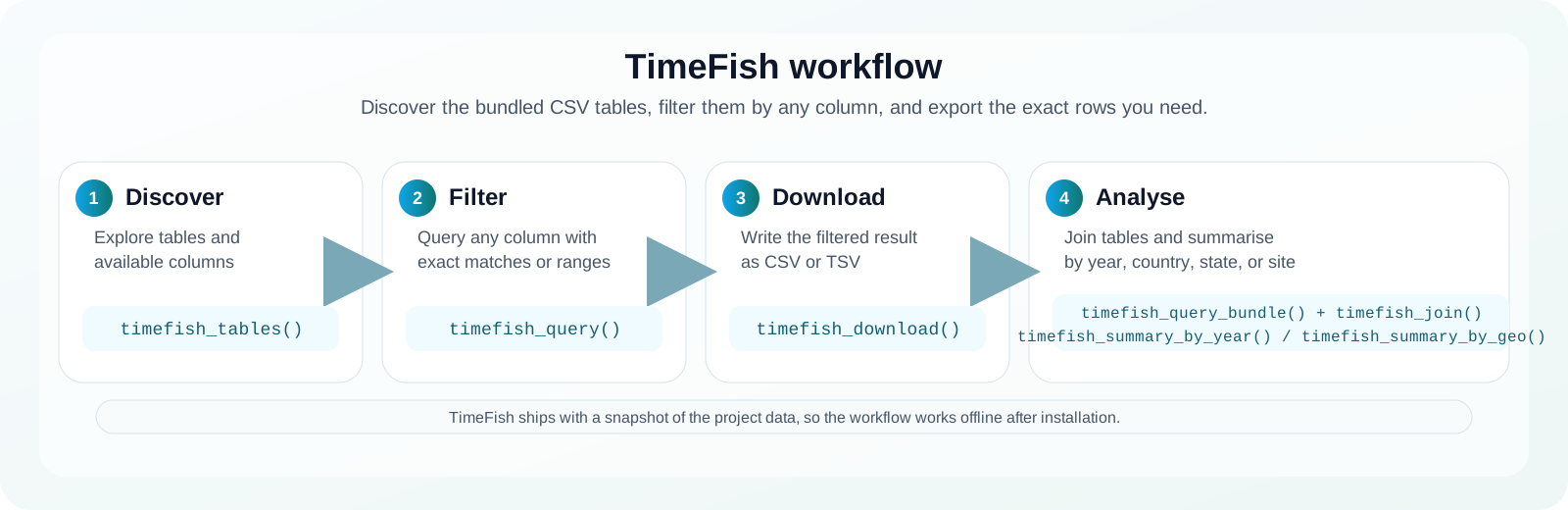
This tutorial walks through the main TimeFish workflow from table discovery to filtered downloads and summaries. The package is intentionally structured around small, focused steps so users can inspect the original CSV files, filter on any column, and export only the rows they need.
Installation
Install timefishr from GitHub using
remotes:
install.packages("remotes")
remotes::install_github("BioScalesLab/TimeFish", subdir = "timefishr")
Alternative using pak:
install.packages("pak")
pak::pak("BioScalesLab/TimeFish/timefishr")
Then load the package:
timefishr uses the bundled local snapshot shipped with
the package. Most users only need one line to get the latest approved
data:
timefish_update(TRUE)That command automatically refreshes the package snapshot with the
newest approved data and updates the local cache used by the package. By
default (from_drive = "auto"), it uses the public snapshot
URLs and does not require Google Drive setup for end users. If drive
credentials are configured, it can also pull _integrated
files from Google Drive before falling back to the public snapshots.
After that call, timefish_census(),
timefish_location(), and timefish_taxonomic()
will read the refreshed cache automatically. The tutorial still works
offline because it reads the packaged files directly.
Developers
- Juan Pablo Quimbayo, Author, maintainer, copyright holder
- Personal website
Package website: https://bioscaleslab.github.io/TimeFish/
About this tutorial
TimeFish ships with three bundled CSV tables:
tables_overview <- data.frame(
  table = c("census", "location", "taxonomic"),
  purpose = c(
    "Species observations by transect",
    "Transect, site, and geography metadata",
    "Species traits and taxonomy"
  ),
  key_fields = c(
    "transect_id, species_code, total_length, abundance",
    "transect_id, country, state, location, site, year",
    "species_code, family, genus, trophic_groups_1, trophic_groups_2"
  ),
  stringsAsFactors = FALSE
)

knitr::kable(tables_overview, caption = "The three bundled TimeFish tables")| table | purpose | key_fields |
|---|---|---|
| census | Species observations by transect | transect_id, species_code, total_length, abundance |
| location | Transect, site, and geography metadata | transect_id, country, state, location, site, year |
| taxonomic | Species traits and taxonomy | species_code, family, genus, trophic_groups_1, trophic_groups_2 |
Effort standardization schematics
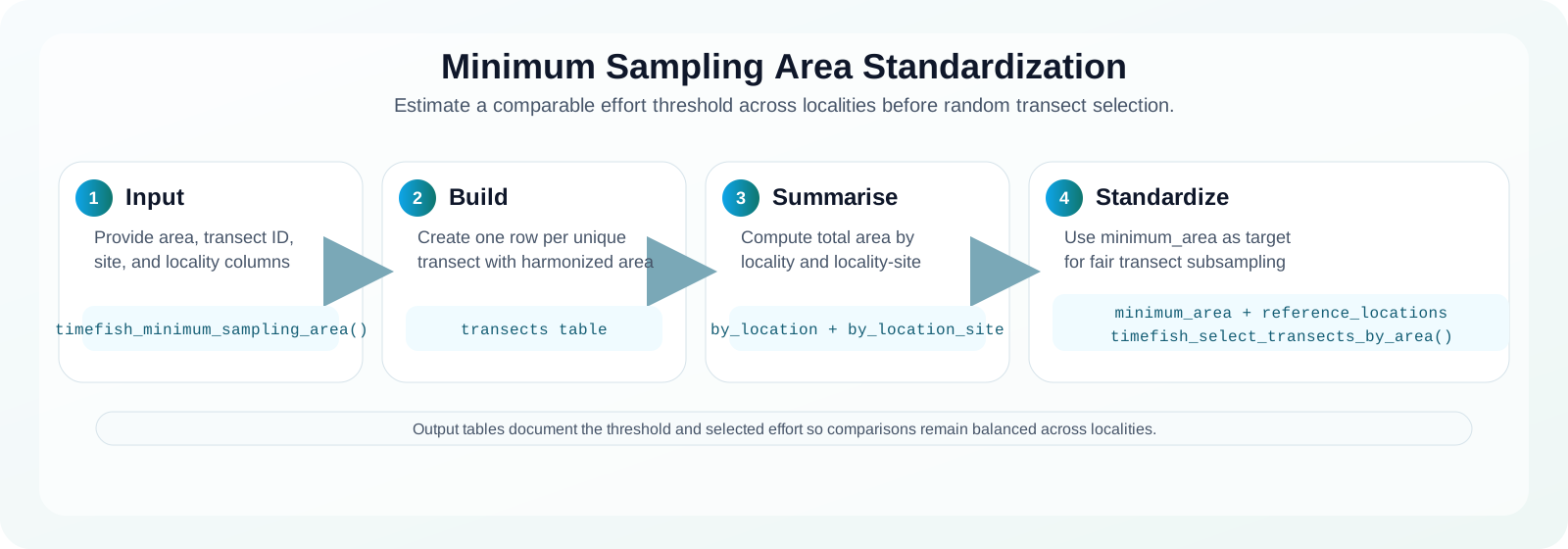
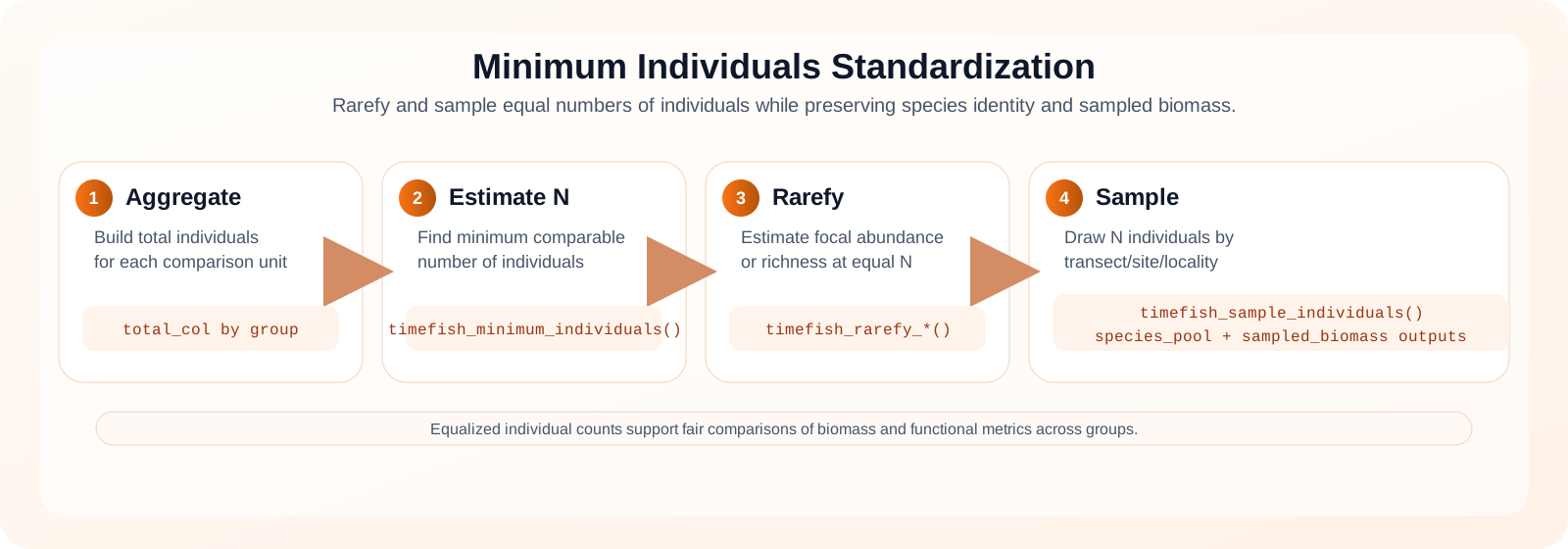
The package includes two complementary standardization workflows: one based on minimum comparable sampled area, and another based on minimum comparable individual counts.
Recommended core settings
Use timefish_available_cores() first, then choose a
practical core setting based on your task size:
- Quick exploratory runs:
cores = 1benchmark_cores = FALSE
- Balanced daily workflow:
cores = min(4, timefish_available_cores())benchmark_cores = TRUE
- Heavy bootstrap / repeated sampling:
cores = max(1, min(8, timefish_available_cores() - 1))benchmark_cores = TRUE
Example with individual-based sampling:
sampled <- timefish_sample_individuals(
  data = joined_data,
  N = 200,
  group_cols = c("location", "site"),
  species_col = "species_code",
  abundance_col = "abundance",
  biomass_col = "biomass",
  reps = 100,
  cores = min(4, timefish_available_cores()),
  benchmark_cores = TRUE
)
1. Know your data
Start by checking the available tables and their columns.
timefish_tables()
#> [1] "census"    "location"  "taxonomic"
timefish_columns("location")
#>  [1] "transect_id"      "province"         "state"            "country"
#>  [5] "location"         "site"             "thermal_category" "no_take_zone"
#>  [9] "longitude"        "latitude"         "ntransect"        "observer"
#> [13] "sampling_method"  "sampling_area_m2" "day"              "month"
#> [17] "year"             "sampling_season"  "depth"            "temperature"
#> [21] "complexity"       "visibility"       "start_time"       "end_time"
#> [25] "biotop"
The data are stored as the original CSV tables from the repository,
so you can query fields such as country,
state, location, site,
year, species_code, or observer
depending on the table you choose.
2. Query and filter
Use timefish_query() to filter any table by any of its
columns. Character filters are matched case-insensitively by default,
and timefish_between() helps with numeric ranges.
location_sc <- timefish_query(
  "location",
  country = "Brazil",
  state = "Santa Catarina",
  year = timefish_between(2007, 2010)
)

location_sc_preview <- location_sc[, c(
  "transect_id", "state", "country", "location", "site", "year",
  "observer", "no_take_zone", "depth", "biotop"
)]

knitr::kable(
  head(location_sc_preview, 8),
  caption = "Preview of filtered location rows (Brazil, Santa Catarina, 2007-2010)"
)| transect_id | state | country | location | site | year | observer | no_take_zone | depth | biotop |
|---|---|---|---|---|---|---|---|---|---|
| 2007_1 | Santa Catarina | Brazil | Deserta Island | West | 2007 | Diego Barneche | yes | 10 | interface |
| 2007_2 | Santa Catarina | Brazil | Deserta Island | West | 2007 | Diego Barneche | yes | 10 | interface |
| 2007_3 | Santa Catarina | Brazil | Deserta Island | West | 2007 | Diego Barneche | yes | 5 | slope |
| 2007_4 | Santa Catarina | Brazil | Deserta Island | West | 2007 | Diego Barneche | yes | 5 | slope |
| 2007_5 | Santa Catarina | Brazil | Deserta Island | West | 2007 | Diego Barneche | yes | 5 | slope |
| 2007_6 | Santa Catarina | Brazil | Deserta Island | West | 2007 | Diego Barneche | yes | 10 | interface |
| 2007_7 | Santa Catarina | Brazil | Deserta Island | West | 2007 | Diego Barneche | yes | 10 | interface |
| 2007_8 | Santa Catarina | Brazil | Deserta Island | West | 2007 | Diego Barneche | yes | 10 | interface |
You can also filter the census table by species or the taxonomic table by traits or family:
census_virginicus <- timefish_query(
  "census",
  species_code = "ani_vir"
)

taxonomic_family <- timefish_query(
  "taxonomic",
  family = "Pomacentridae"
)

list(
  census_rows = nrow(census_virginicus),
  taxonomic_rows = nrow(taxonomic_family)
)
#> $census_rows
#> [1] 3190
#>
#> $taxonomic_rows
#> [1] 9
If you want to filter several tables at once, use
timefish_query_bundle().
bundle <- timefish_query_bundle(
  location = list(country = "Brazil", state = "Santa Catarina"),
  census = list(species_code = "ani_vir")
)

list(
  census_rows = nrow(bundle$census),
  location_rows = nrow(bundle$location),
  taxonomic_rows = nrow(bundle$taxonomic)
)
#> $census_rows
#> [1] 3190
#>
#> $location_rows
#> [1] 2330
#>
#> $taxonomic_rows
#> [1] 189
Example: two states in the same year (2020)
Use a vector in state and a fixed year value:
location_two_states_2020 <- timefish_query(
  "location",
  country = "Brazil",
  state = c("santa_catarina", "sao_paulo"),
  year = 2020
)

location_two_states_2020
This pattern keeps rows from both states for the same year.
3. Download filtered data
Once you have the filtered rows you want, write them to disk.
timefish_download(
  "location",
  country = "Brazil",
  state = "Santa Catarina",
  directory = tempdir()
)

timefish_download_census(species_code = "ani_vir")
timefish_download_uvcs(species_code = "ani_vir")
timefish_download_taxonomic(family = "Pomacentridae")
The helper creates a CSV or TSV file with a date-stamped name by default. You can also pass a custom file name if you want to save a curated export.
4. Join and summarise
When you want to combine the tables for analysis, use
timefish_join().
data <- timefish_join()

list(
  rows = nrow(data),
  columns = ncol(data),
  has_biomass = "biomass" %in% names(data)
)
#> $rows
#> [1] 197405
#>
#> $columns
#> [1] 36
#>
#> $has_biomass
#> [1] TRUE
The merged table can then be summarised by year or geography.
year_summary <- timefish_summary_by_year(data, metric = "abundance")
geo_summary <- timefish_summary_by_geo(data, metric = "biomass", level = "state")

head(year_summary)
#>   year     value
#> 1 2007  79.72000
#> 2 2008  91.42381
#> 3 2009  59.57463
#> 4 2010  69.03797
#> 5 2011 125.91489
#> 6 2012  83.62130
head(geo_summary)
#>   country          state longitude  latitude    value n_censos n_sites
#> 1  Brazil Santa Catarina -48.37950 -27.33282  495.823     2217      18
#> 2  Brazil      Sao Paulo -45.63326 -24.02124 6111.604      576      17
#>   n_locations
#> 1           8
#> 2           3
5. What to use next
The package is built around a simple flow:
- inspect the available CSV tables,
- filter the rows you need,
- download the filtered result,
- join or summarise the output for analysis.
For example:
timefish_tables()
timefish_columns("location")
timefish_query("census", species_code = "ani_vir")
timefish_download_census(species_code = "ani_vir")
timefish_join()
timefish_summary_by_geo(timefish_join(), metric = "biomass", level = "state")- Use
timefish_tables()andtimefish_columns()to inspect the data. - Use
timefish_query()for targeted filtering of one table. - Use
timefish_query_bundle()to filter several tables at once. - Use
timefish_download()to export a filtered subset. - Use
timefish_download_census(),timefish_download_uvc(), ortimefish_download_uvcs()for UVC data. - Use
timefish_download_location()for geography metadata. - Use
timefish_download_taxonomic()for species traits and taxonomy. - Use
timefish_join()when you need a merged analysis table. - Use
timefish_summary_by_year()andtimefish_summary_by_geo()for quick summaries.
For the package README and the live documentation site, see the
GitHub Pages site for timefishr:
https://bioscaleslab.github.io/TimeFish/
Citation
Run this in R to see the recommended citation format:
citation("timefishr")If you need the full contributor list for the underlying TimeFISH data record, use the Zenodo record linked in the package README.