 |
TimeFish R package |
|---|
Query, filter, download, and summarise TimeFish data in R.
timefishr provides direct R access to the TimeFish reef fish monitoring CSV tables. The package is built around a simple workflow: inspect the original columns, filter any table by any column, download the filtered result, and then join or summarise the data for analysis.
Most users only need one line to get the latest approved data:
timefish_update(TRUE)That command automatically refreshes the package snapshot with the newest approved data and updates the local cache used by the package. After that call, timefish_census(), timefish_location(), and timefish_taxonomic() will read the refreshed cache automatically.
Developers
- Juan Pablo Quimbayo, Author, maintainer, copyright holder
- Personal website
Package website: https://bioscaleslab.github.io/TimeFish/
Public scope: this page documents the
timefishrpackage only. Shiny dashboard source code, internal dashboard documentation, and deployment notes are private/internal and should not be published as part of the package docs.
Installation
Install timefishr from GitHub using remotes:
install.packages("remotes")
remotes::install_github("BioScalesLab/TimeFish", subdir = "timefishr")
Alternative with pak:
install.packages("pak")
pak::pak("BioScalesLab/TimeFish/timefishr")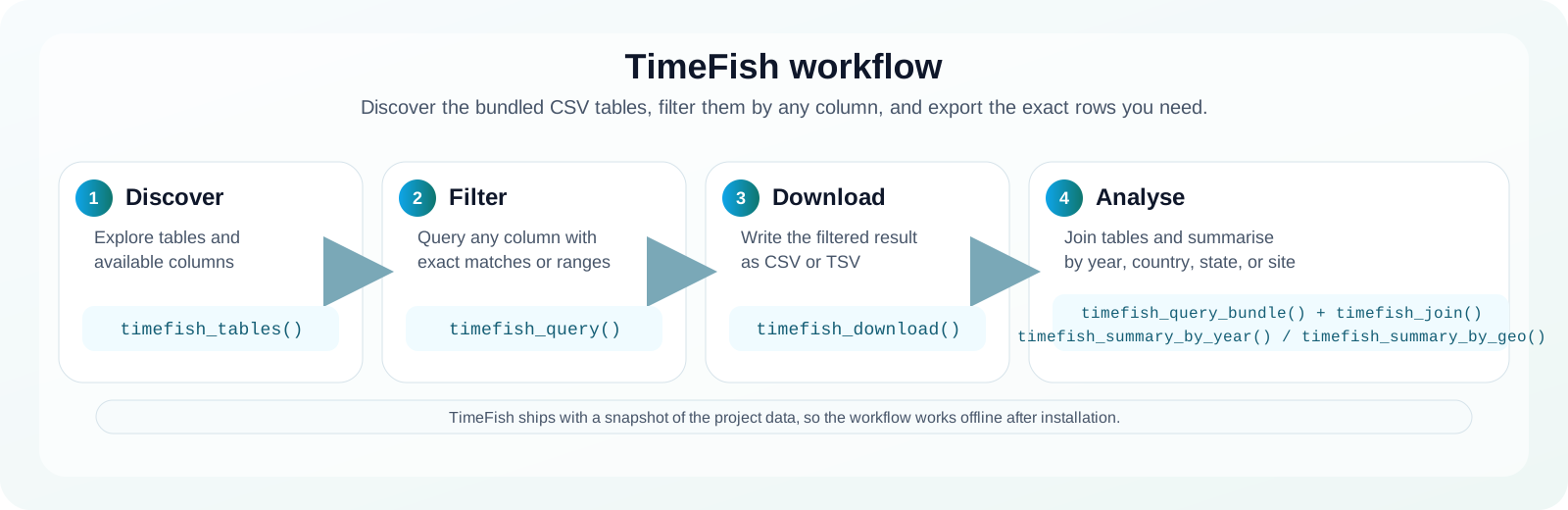
The bundled tables
TimeFish ships with three CSV tables that you can inspect and filter directly from R.
| Table | Purpose | Key columns |
|---|---|---|
census |
Species observations by transect |
transect_id, species_code, total_length, abundance
|
location |
Transect, site, and geography metadata |
transect_id, country, state, location, site, year
|
taxonomic |
Species traits and taxonomy |
species_code, family, genus, trophic_groups_1, trophic_groups_2
|
Query and download
List the bundled tables and inspect their columns:
library(timefishr)

timefish_tables()
timefish_columns("location")
Filter any table by any column:
location_sc <- timefish_query(
  "location",
  country = "Brazil",
  state = "Santa Catarina",
  year = timefish_between(2007, 2010)
)

census_virginicus <- timefish_query(
  "census",
  species_code = "ani_vir"
)
Filter two states in the same year (for example, 2013):
location_two_states_2013 <- timefish_query(
  "location",
  country = "Brazil",
  state = c("santa_catarina", "sao_paulo"),
  year = 2013
)
Write a filtered table to disk:
timefish_download(
  "location",
  country = "Brazil",
  state = "Santa Catarina",
  directory = tempdir()
)
If you want explicit helpers for each original CSV, use:
timefish_download_census(species_code = "ani_vir")
timefish_download_uvc(species_code = "ani_vir")
timefish_download_uvcs(species_code = "ani_vir")
timefish_download_location(country = "Brazil", state = "Santa Catarina")
timefish_download_taxonomic(family = "Pomacentridae")
Join and summarise
census <- timefish_census()
location <- timefish_location()
taxonomic <- timefish_taxonomic()

data <- timefish_join()
year_summary <- timefish_summary_by_year(data, metric = "abundance")
geo_summary <- timefish_summary_by_geo(data, metric = "biomass", level = "state")
Multi-table queries
When you want to filter the three CSVs at once, use:
bundle <- timefish_query_bundle(
  location = list(country = "Brazil", state = "Santa Catarina"),
  census = list(species_code = "ani_vir")
)
If you want the joined result instead, set join = TRUE.
What the package provides
The package is organized around a simple workflow:
- inspect the bundled tables,
- filter the rows you need,
- download the filtered data,
- join or summarise the result for analysis.
1) Inspect the bundled CSVs
timefish_tables()
timefish_columns("location")
This tells you which CSV files are available and which columns you can filter. For example, timefish_columns("location") lets you confirm that columns such as country, state, location, site, and year are present before you start filtering.
2) Filter the data you need
timefish_query(
  "location",
  country = "Brazil",
  state = "Santa Catarina",
  year = timefish_between(2007, 2010)
)
This keeps only the rows that match your criteria. You can also filter other tables, for example:
timefish_query("census", species_code = "ani_vir")
timefish_query("taxonomic", family = "Pomacentridae")
timefish_query_bundle(
  location = list(country = "Brazil", state = "Santa Catarina"),
  census = list(species_code = "ani_vir")
)
3) Download the filtered result
timefish_download_location(country = "Brazil", state = "Santa Catarina")
timefish_download_census(species_code = "ani_vir")
timefish_download_taxonomic(family = "Pomacentridae")
These helpers save the filtered rows to a CSV or TSV file so you can reuse them outside R or share them with collaborators.
4) Work with the tables directly
These functions read the original tables without filtering. For example, timefish_census() gives you the UVC observations, while timefish_taxonomic() gives you the species traits and taxonomy.
5) Join and summarise for analysis
data <- timefish_join()
timefish_summary_by_year(data, metric = "abundance")
timefish_summary_by_geo(data, metric = "biomass", level = "state")
This is useful when you want a merged analysis table with biomass or quick summaries by year, country, state, or site.
The package ships with a snapshot of the repository data inside inst/extdata/ so it works offline after installation and does not depend on Google Drive at runtime.
Citation
Run this in R to see the recommended citation format:
citation("timefishr")If you are citing the R interface itself, use:
Quimbayo, J. P. (2026). timefishr: An R package for downloading raw fish community data across time. GitHub repository.
If you are citing the underlying TimeFISH data record or need the full contributor list, use:
TimeFISH 2.0: Fish assemblages in a 18-year monitoring program. Zenodo. DOI: 10.5281/zenodo.15353415.